Basics of Python

What is Python?
🐍Python is a high-level, general-purpose programming language with an elegant syntax that allows programmers to focus more on problem-solving than on syntax errors. One of the primary goals of Python Developers is to keep it fun to use. Python has become a big buzz in the field of modern software development, infrastructure management, and especially in Data Science🔭 and Artificial Intelligence🔬. Most recently, Python has risen to the top 3 list of the TIOBE index of language popularity.
Python is becoming increasingly everywhere, but you must be wondering why Python has become such a hot topic in the developers’ world. In this tutorial, you will understand all the reasons behind Python’s popularity.
🏃♂️Let's Understand In Short Way:-
Python is an Open source, general purpose, high-level, and object-oriented programming language.
It was created by Guido van Rossum
Python consists of vast libraries and various frameworks like Django, Tensorflow, Flask, Pandas, Keras etc.
How to Install Python?
Here are the few steps, which are required for the installation of Python: -
Visit the Official Website: Go to the official Python website at python.org/downloads in your web browser.
Choose a Version: Python has multiple versions available, but it's recommended to choose the latest version from the Python 3. x series (e.g., Python 3.9). Python 3. x is the current and actively maintained version.
Download the Installer: On the Python website, click on the "Downloads" tab. You'll see various download options for different platforms (Windows, macOS, Linux). Choose the installer that matches your operating system.
Run the Installer:
Windows: Double-click the downloaded installer executable (usually named something like
python-3.9.6.exe). Check the box that says "Add Python 3.9 to PATH" during the installation process. This will make it easier to run Python from the command line.macOS: Double-click the downloaded installer package (usually named something like
python-3.9.6-macosx10.9.pkg). Follow the on-screen instructions to complete the installation.Linux: Python is often pre-installed on Linux systems. To check if Python is already installed, open a terminal and type
python3 --version. If it's not installed, you can use your package manager to install it.
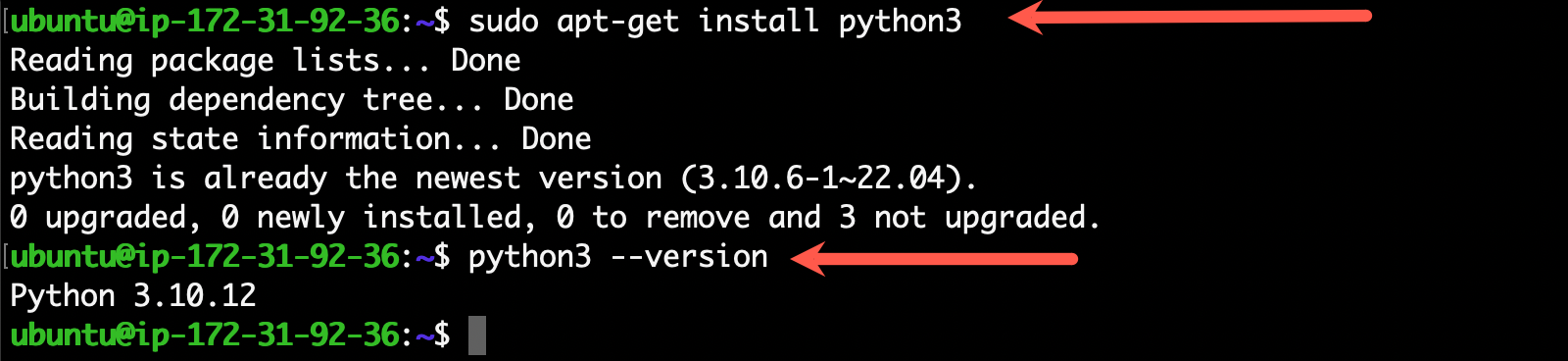
Task 1: - Install Python in your respective OS, and check the version
To install Python on Linux, use the below command. Once the python is installed, check the version.
Task 2: - Data Types In Python
The different Data Types in Python are as follows: -
Data Types Table:
Data Types | Classes | Description |
Numeric | int, float, complex | holds numeric values |
String | str | holds sequence of characters |
Sequence | list, tuple, range | holds collection of items |
Mapping | dict | holds data in key-value pair form |
Boolean | bool | holds either |
Set | set, frozeenset | hold collection of unique items |
Python Numeric Data type:
In Python, numeric data type is used to hold numeric values.
Integers, floating-point numbers and complex numbers fall under python numbers category. They are defined as int, float and complex classes in Python.
int- holds signed integers of non-limited length.float- holds floating decimal points and it's accurate up to 15 decimal places.complex- holds complex numbers.
We can use the type() function to know which class a variable or a value belongs to.
Let's see an example,
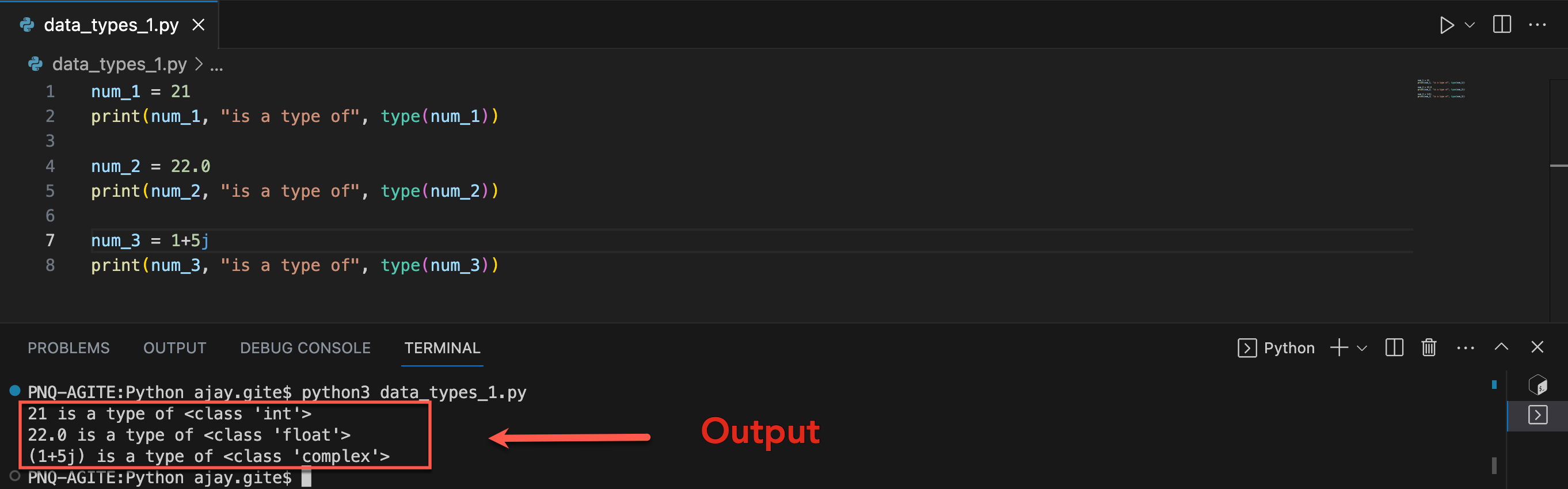
In the above example, we have created three variables named num1, num2 and num3 with values 21, 22.0, and 1+5j respectively.
We have also used the type() function to know which class a certain variable belongs to.
Since,
21 is an integer value,
type()returnsintas the class of num1 i.e<class 'int'>22.0 is a floating value,
type()returnsfloatas the class of num2 i.e<class 'float'>1 + 5jis a complex number,type()returnscomplexas the class of num3 i.e<class 'complex'>
Python List Data Type:
List📝 is an ordered collection of similar or different types of items separated by commas and enclosed within brackets [ ]. For example, Here, we have created a list named languages with 4 strings values inside it
Access List Items🧏
To access items from a list, we use the index number (0, 1, 2 ...). For example,
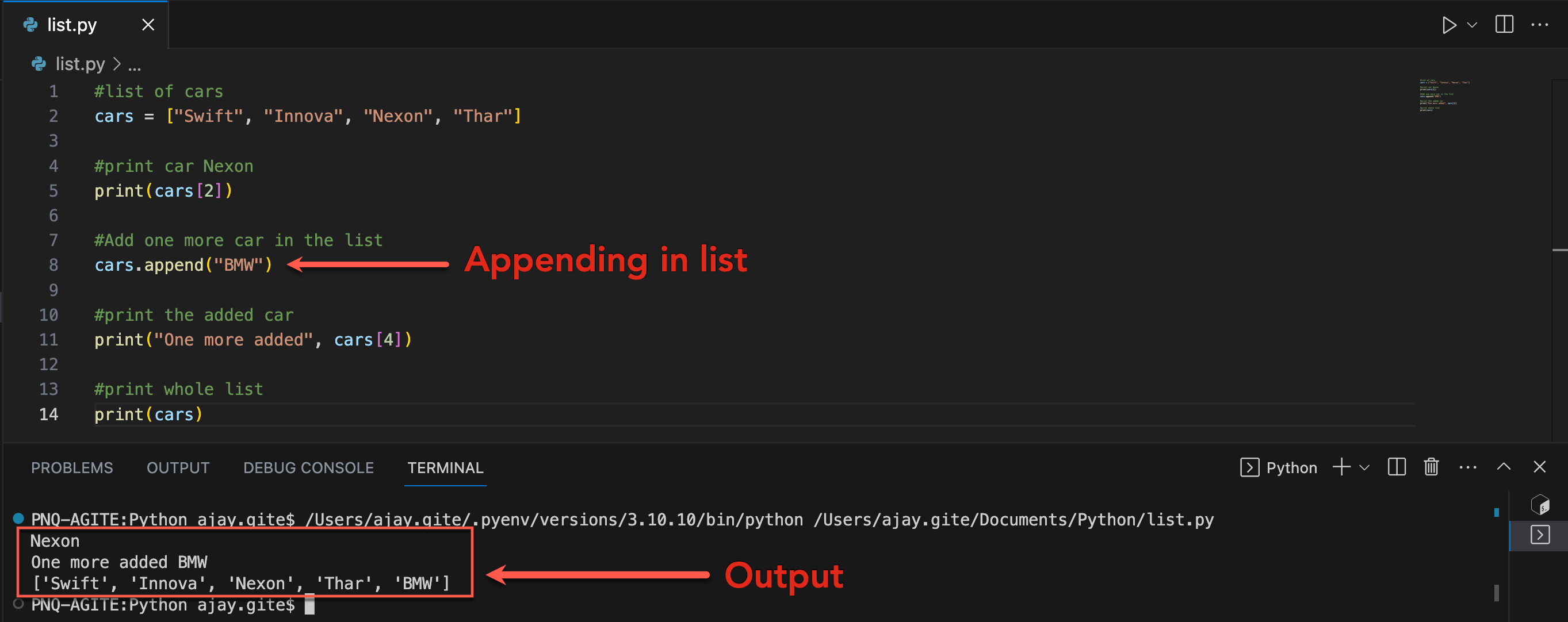
In the above example, we have used the index values to access items from the languages list.
cars[2]- access the second item from languages i.e.Nexoncars.append- Appending the item in listcars[4]- access the fourth item from languages i.e.BMW
Python Tuple Data Type:
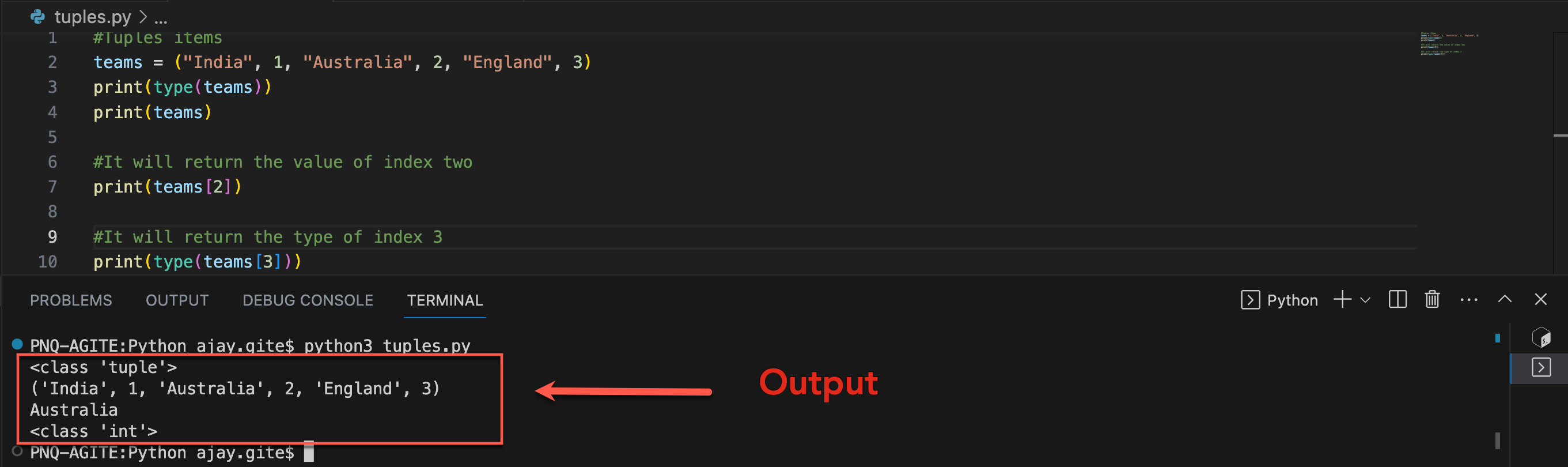
Tuple is an ordered sequence of items same as a list. The only difference is that tuples are immutable. Tuples once created cannot be modified.
In Python, we use the parentheses () to store items of a tuple.
Here, the product is a tuple with a string value India, Australia, England and integer values 1, 2, 3.
Access Tuple Items
Similar to lists, we use the index number to access tuple items in Python. For example,
Python String Data Type:
String is a sequence of characters represented by either single or double quotes. For example,
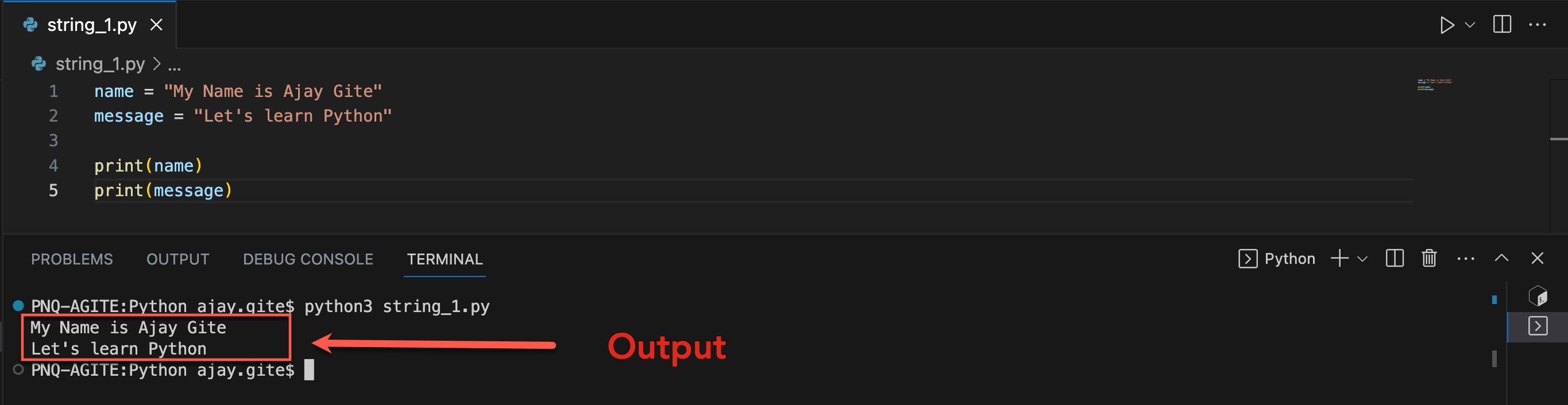
In the above example, we have created string-type variables: name and message with values 'My name is Ajay Gite' and 'Let's learn Python' respectively.
Python Set Data Type:
Set is an unordered collection of unique items. Set is defined by values separated by commas inside braces { }. For example,
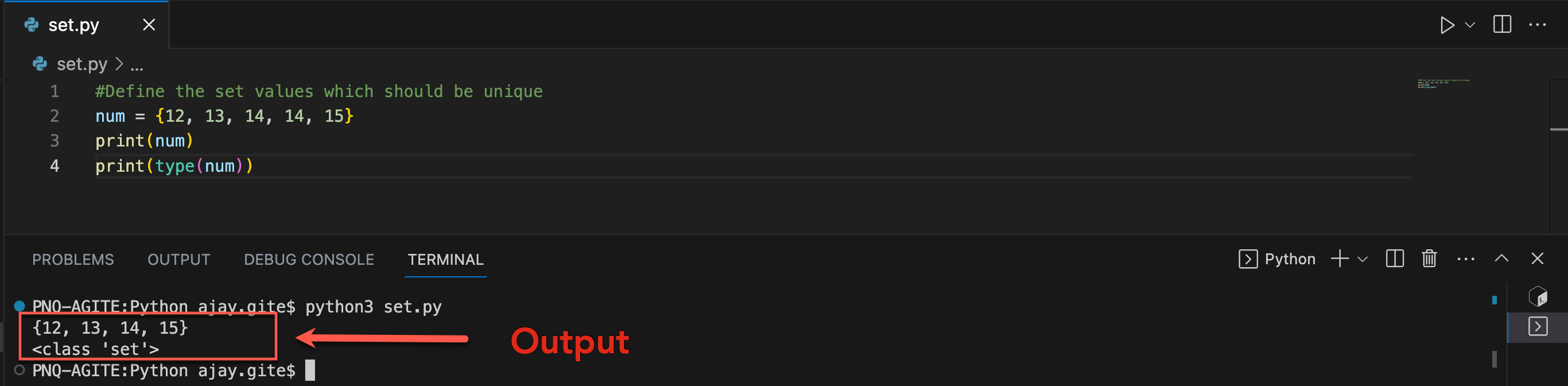
Here, we have created a set named student_info with 5 integer values 2 with same number. So, while printing it doesn't display duplicate numbers.
Since sets are unordered collections, indexing has no meaning. Hence, the slicing operator [] does not work.
Python Dictionary Data Type:
Python dictionary is an ordered collection of items. It stores elements in key/value pairs. Here, keys are unique identifiers that are associated with each value.
Let's see an example,
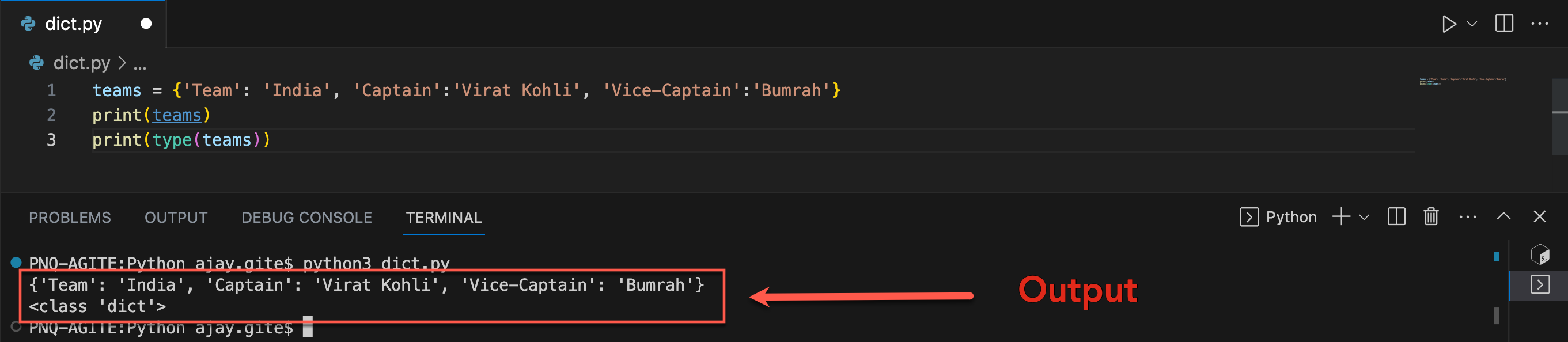
In the above example, we have created a dictionary named teams. Here,
Keys are
'Team','Captain','Vice-Captain'Values are
'India','Virat Kohli','Bumrah'
Access Dictionary Values Using Keys🔐
We use keys to retrieve the respective value. But not the other way around. For example,
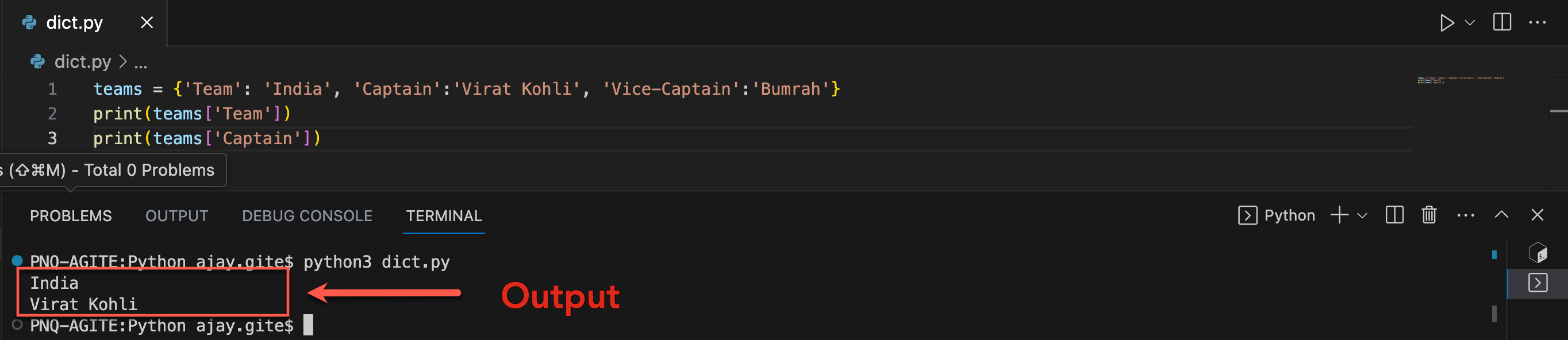
Here, we have accessed values using keys from the capital_city dictionary. Since 'Team' is key, teams['Team'] accesses its respective value i.e. India However, 'Virat Kohli' is the value for the 'Captain' key, so teams['Virat Kohli'] throws an error message.
Conclusion:
Python is an important tool for organizations, as we learned in today's blog. In addition, we examined different types of data in Python, which might sound complicated but is actually quite straightforward. Learning about Python's different data types can be fun and useful for organizations. Let's continue to explore the amazing world of Python programming together in my next blog!